
By Gurbaj Singh · Reviewed 21 October 2026
Reviewed 15 October 2026. Pricing and features can change, so confirm them on Sender’s website before choosing a plan.
Sender sits in an increasingly useful middle ground. It costs less than many established ecommerce email platforms, gives small lists an unusually generous free allowance, and now covers campaigns, automations, forms, landing pages, transactional email and SMS. The question is not whether Sender has features. It is whether those features are deep enough for the way your store actually markets.
My short answer is: Sender is good enough for many small and growing ecommerce businesses, especially when cost and ease of use matter more than having the deepest possible customer-data and automation system. It is less convincing for complex, multi-store or highly customised lifecycle programmes that need mature integrations, granular experimentation and extensive data orchestration.
If that sounds close to your situation, you can start with Sender’s free plan and test the workflow with your own store data before paying.
Sender review: the quick verdict
| Area | Practical verdict |
|---|---|
| Best for | Small businesses, newer ecommerce stores, lean teams and price-conscious marketers |
| Main strength | A strong free plan and a broad set of core email, automation and lead-capture tools |
| Main compromise | Less ecosystem depth and less advanced customer-data orchestration than specialist enterprise platforms |
| Free plan | Up to 2,500 subscribers and 15,000 emails per month, with Sender branding |
| Ecommerce fit | Good for core welcome, cart, purchase, post-purchase, win-back and promotional use cases |
| Supported store connections | Shopify, WooCommerce, PrestaShop, Jumpseller and Drupal are listed in Sender’s current documentation |
| Automation | Visual workflows, prebuilt templates, ecommerce triggers and email/SMS options, with plan-dependent advanced features |
| Segmentation | Dynamic rules using profile, engagement, SMS and ecommerce conditions |
| Deliverability controls | Domain authentication, suppression management and reporting tools, but no platform can guarantee inbox placement |
| Overall | A credible value option, provided you test the exact integration and reporting you need |
What Sender includes
Sender combines several functions that smaller teams often buy separately:
- Email campaigns and newsletters
- A drag-and-drop and HTML email editor
- Marketing automation workflows
- SMS campaigns and email/SMS workflows on eligible plans
- Signup forms, popups and landing pages
- Subscriber groups, dynamic segments and custom fields
- Ecommerce triggers and reporting
- Transactional email through SMTP or API
- Real-time campaign reporting, click heatmaps and revenue attribution
The product is not limited to ecommerce, but ecommerce is one of its clearest use cases. Sender documents abandoned-cart, product-purchase and order-fulfilled triggers, alongside welcome, date, link-click and subscriber-group triggers. The template library covers ecommerce and broader marketing use cases. Treat a template as a starting point, then verify the event data, timing, purchase exits and reporting with your own store before relying on it.
Pricing: where Sender becomes attractive
The following prices were displayed on Sender’s official pricing page on 6 October 2026 with the audience slider set to 500 subscribers and the first-time annual discount selected.
Sender subscriber cost calculator
Enter the number of marketable subscribers. The estimate updates instantly to the matching public Sender Standard tier.
Sender
Pricing bands checked 21 October 2026. These are base email-plan estimates in USD. Taxes, SMS, add-ons, promotions and billing country can change the final checkout total.
Enable JavaScript to calculate the relevant pricing tier.
| Plan | Displayed starting price | Included email volume | Notable points |
|---|---|---|---|
| Free Forever | $0 | Up to 15,000 emails per month | Up to 2,500 subscribers, one seat, Sender branding and a 14-day Professional trial |
| Standard | $6.30 per month on the displayed annual offer | Up to 6,000 emails per month at 500 subscribers | Three seats, no Sender branding, SMS, A/B testing and advanced ecommerce reports |
| Professional | $10.50 per month on the displayed annual offer | Up to 12,000 emails per month at 500 subscribers | Ten seats, advanced automation and reports, priority support and eligible dedicated IP options |
| Enterprise | Custom | Unlimited emails listed | Advanced permissions, SSO, SLA, audit logs, phone support and a success manager |
Those starting prices are not enough to estimate your long-term cost. Sender says Standard email volume is calculated at 12 times the selected subscriber tier and Professional at 24 times. SMS pricing varies by destination country. Annual discounts, VAT and introductory offers can also change the total.
The free plan is the headline advantage. A new store can test forms, campaigns and automation without entering a card. The compromise is visible Sender branding and fewer seats or advanced controls.
Decision rule: compare the price at your current subscriber count and again at the count you expect in 12 months. Include SMS, seats and send frequency rather than comparing only the cheapest advertised figure.
Email editor and templates
Sender's current editor uses a central canvas with building blocks, section templates and global design settings. Blocks include headlines, paragraphs, images, buttons, product elements, timers, reviews, menus, social icons and custom HTML. The editor also supports mobile visibility controls, reusable sections, previewing and test sends.
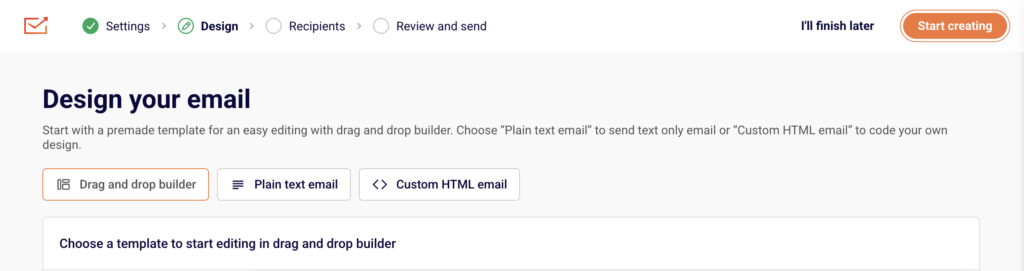
Actual Sender interface screenshot from the official drag-and-drop editor documentation.
Sender advertises more than 100 premade email templates. That is enough variety to avoid starting from a blank page, but template count is not a reason to choose a platform on its own. Test whether you can reproduce your brand system, product layouts and mobile hierarchy without fighting the editor.
What the editor does well
- Gives non-designers a visual starting point
- Includes ecommerce-specific and reusable content blocks
- Supports custom HTML when the visual editor is not enough
- Provides desktop and mobile previews
- Allows global styling and reusable sections
Where to be cautious
- Some editor features are reserved for higher plans
- Imported or heavily customised templates still require email-client testing
- A good-looking template does not solve accessibility, clipping or deliverability problems
Automation: enough for the core customer journey
Sender's visual builder can start workflows from subscriber, date, engagement and ecommerce events. Current official documentation lists triggers such as a subscriber joining a group, a cart being abandoned, a product being purchased and an order being fulfilled.
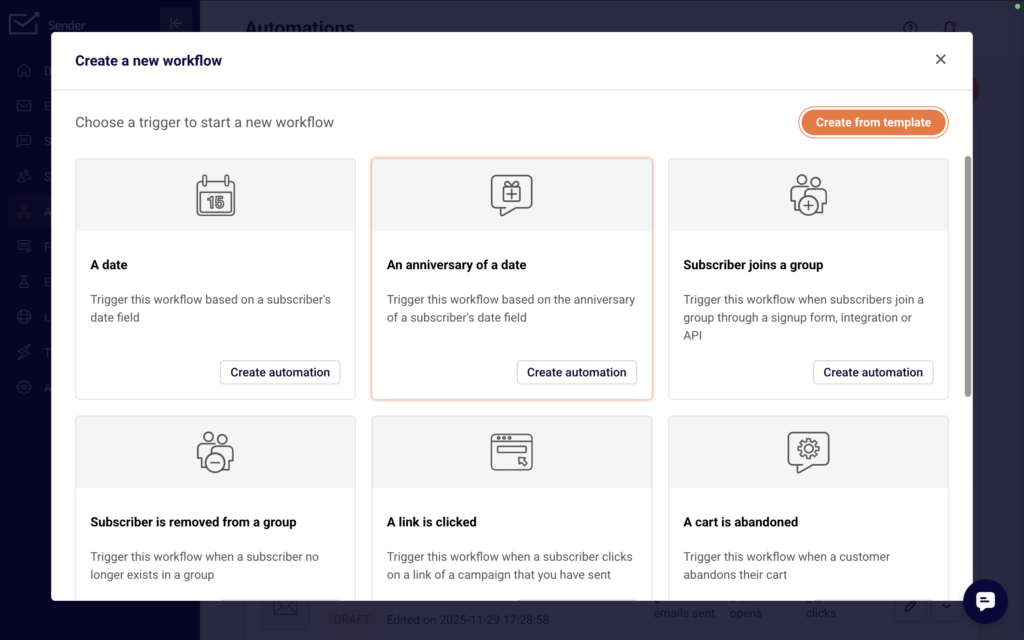
Actual Sender interface screenshot from the official automation setup documentation.
For a small ecommerce programme, that covers the essential lifecycle:
- Welcome and first-purchase education
- Abandoned-cart recovery
- Order confirmation and post-purchase guidance
- Cross-sell and repeat-purchase reminders
- Review or feedback requests
- Win-back and re-engagement
The real evaluation is not how many workflows appear in the template library. Check whether your store sends the right event, whether product and order fields are available, whether existing customers can be excluded, and how the platform handles people already inside a flow when you edit it.
If you only need these core journeys, test the automation builder on Sender's free plan before importing your full list.
Segmentation and subscriber management
Sender distinguishes groups from segments. Groups are useful for organising contacts or assigning an import destination. Segments update according to rules.
The current segmentation documentation lists conditions based on subscription status, subscriber details, campaign activity, SMS activity, ecommerce metrics, abandoned carts and custom fields. Multiple conditions can be combined.
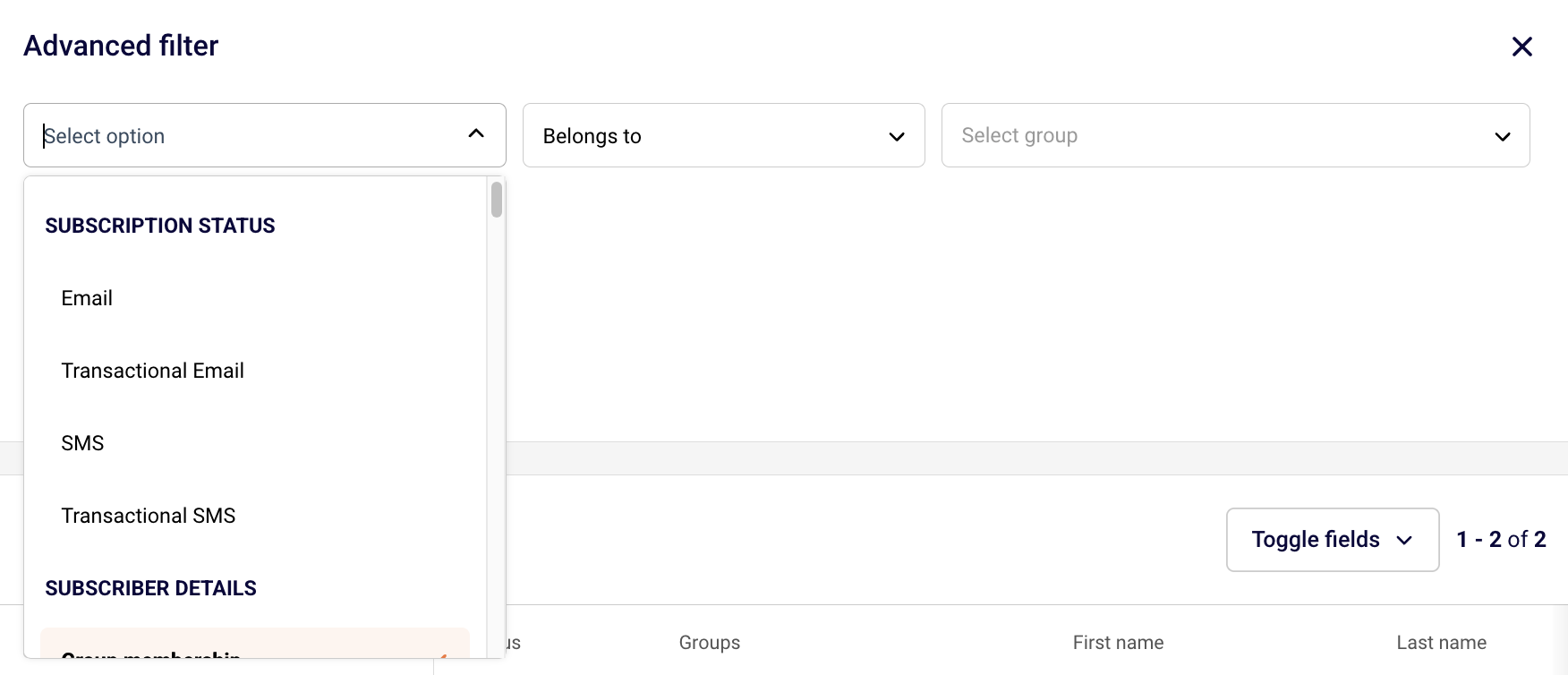
Actual Sender interface screenshot from the official segment-management documentation.
This should be sufficient for common audiences such as:
| Segment | Example rule |
|---|---|
| New subscriber | Joined the welcome group recently and has not purchased |
| Engaged non-buyer | Opened or clicked recently but has no recorded purchase |
| First-time customer | Has exactly one recorded purchase |
| Repeat customer | Has more than one recorded purchase |
| Cart abandoner | Triggered a cart event without the corresponding purchase |
| At-risk customer | Purchased previously but has not engaged or bought within the chosen period |
The limitation is not necessarily rule availability. It is whether the integration supplies reliable, timely store data. Test the actual fields and events produced by your platform before planning a complicated segmentation model.
Ecommerce integrations
Sender's documentation currently describes native ecommerce connections for Shopify, WooCommerce, PrestaShop, Jumpseller and Drupal. It also lists WordPress, Zapier, Make, Pabbly, Pipedream and other workflow or lead-capture integrations.
| Need | What to verify before migrating |
|---|---|
| Product catalogue | Products and URLs populate the blocks you intend to use |
| Customer sync | Guest and registered customer records reach the correct group |
| Cart tracking | Consent and cart events are captured correctly |
| Purchase events | Orders stop cart flows and start the correct post-purchase sequence |
| Historical data | Previous orders and engagement are available where needed |
| Revenue reporting | Test orders are attributed to the correct campaign or automation |
| Consent status | Opt-in, unsubscribe and suppression states survive the migration |
Do not assume that a logo on an integrations page means every data field is available. Connect a test store, place a test order, abandon a test cart and inspect the resulting subscriber timeline.
Sender versus a more specialised ecommerce platform
Choose Sender when the store needs a dependable core email programme without paying for depth it will not use. Choose a more specialised platform when the business already relies on complex data, multi-channel orchestration or sophisticated reporting.
| If this is your situation | Better starting point | Why |
|---|---|---|
| A new or smaller store needs forms, campaigns, welcome emails and cart recovery | Sender | The free plan and core ecommerce triggers make it practical to validate a lifecycle programme before taking on a larger subscription. |
| Your team needs simple purchase, cart and engagement-based audiences | Sender | Its groups, dynamic segments and ecommerce conditions can support the common lifecycle decisions. |
| Several brands or stores share one programme | Evaluate a more specialised platform | Account structure, permissions, reporting and data governance become more important than entry price. |
| Your retention programme depends on many custom events, predictive models or a data warehouse | Evaluate a more specialised platform | Confirm that every required event, field and audience rule can be carried across before moving. |
| You are changing platforms mainly to save money | Run a controlled Sender trial first | Rebuild the welcome and cart flows, test order attribution and price the next 12 months before migrating the full list. |
For WooCommerce specifically, follow the step-by-step Sender setup guide and test the connection before activating any live automation.
A practical 30-minute Sender trial
- Create a Sender account and authenticate a sending domain.
- Connect one store and turn on tracking where the integration requires it.
- Create a test subscriber, an abandoned cart and a completed test order.
- Confirm that the subscriber, products, cart event and order event reach the expected profile or group.
- Build one welcome flow and one cart-recovery flow with a purchase exit.
- Send test emails on mobile and desktop, then confirm the attribution rules before reading revenue reports.
Deliverability: what Sender can and cannot do
Sender provides domain-authentication instructions for SPF, DKIM and DMARC, suppression management, bounce classifications, reporting and support documentation. These are necessary controls.
They are not an inbox guarantee. Deliverability also depends on permission, list quality, complaint levels, engagement, message relevance and the reputation of the sending domain and infrastructure.
Before sending at volume:
- Verify domain ownership.
- Publish the exact DNS records shown in your Sender account.
- Avoid creating a second SPF record. Merge authorised services into one valid SPF policy.
- Confirm SPF, DKIM and DMARC in Sender.
- Import only contacts you are permitted to email.
- Start with expected recipients and monitor bounces, complaints and engagement.
Sender's domain-authentication guide explains the current interface and validation process.
Reporting and analytics
Sender lists real-time campaign reports, ecommerce revenue reports, click heatmaps, performance by group and inbox provider, automation reports, form reports and Google Analytics tracking. Professional adds more advanced reporting features.
For evaluation, ask whether you can answer:
- Which campaign or automation generated an order?
- Is revenue based on a documented attribution window?
- Can you separate campaign, automation, email and SMS performance?
- Can you export the underlying data?
- Can you compare groups, devices and inbox providers?
Run test transactions before relying on dashboard revenue for business decisions.
Sender pros and cons
| Pros | Cons |
|---|---|
| Generous free allowance for a small list | Free emails and forms retain Sender branding |
| Low displayed starting prices | Cost rises with subscriber tier and required send volume |
| Campaigns, automation, forms, landing pages, SMS and transactional email in one product | Some advanced automation, reporting and editor capabilities require higher plans |
| Native Shopify and WooCommerce support | Smaller ecosystem and fewer specialist integrations than larger competitors |
| Dynamic segmentation with ecommerce conditions | Data depth depends on the quality of the store integration |
| Visual editor plus custom HTML | Complex brand systems still need careful rendering tests |
| Domain authentication and deliverability controls | No email platform can guarantee inbox placement |
| 24/7 email and chat support is listed across plans | Complex multi-brand governance may require Enterprise or another platform |
Who should use Sender?
Sender is worth shortlisting if you run a small or growing ecommerce store, need newsletters, forms and core lifecycle automation, want to control software cost while the list is small, and can confirm that your store connection supplies the required data.
Who should choose something else?
Evaluate alternatives more closely if you operate several brands or storefronts, depend on a large customer-data warehouse or many custom events, need extensive predictive analytics or experimentation, or cannot support a business-critical integration reliably through a native connection or middleware.
Final verdict
Sender is a credible value choice for ecommerce stores that need a working email programme without paying for capabilities they will not use. The strongest case is the combination of a generous free allowance, core ecommerce triggers and a broad feature set for campaigns, forms and automation.
Its limits become more important as the retention programme becomes more complex. Test the integration, event depth, purchase exits and reporting with your own store. Do not migrate solely because the entry price is lower.
For a smaller store, start with a controlled trial: connect the store, authenticate the domain, trigger a test cart and purchase event, and verify reporting. Start with Sender's free plan.
Frequently asked questions
Is Sender free for ecommerce?
Yes. Sender currently lists a Free Forever plan with up to 2,500 subscribers and 15,000 emails per month. It includes core email tools, automation, forms, landing pages and transactional email. Emails and forms carry Sender branding on the free plan, so check the current plan comparison before making a long-term decision.
Does Sender work with WooCommerce?
Yes. Sender provides a WooCommerce plugin that uses an API token for authentication. Enable tracking, assign the right subscriber groups and place a test order before building live flows. Sender documents cart and product-purchase events for connected ecommerce stores.
Does Sender work with Shopify?
Yes. Sender offers a Shopify app. After connecting the store, confirm the connection appears as active, then test a subscriber capture, cart and purchase event. Shopify cart tracking is handled through the connected app, but every store should still test the event timeline before launching automations.
Can Sender replace Klaviyo?
It can for a smaller store running standard campaigns, welcome flows, cart recovery and post-purchase automation. It is not an automatic replacement for a programme built around complex custom events, predictive analytics, deep reporting or many integrations. Compare the exact workflows and data fields before migrating.
Is Sender good for email deliverability?
Sender provides the technical controls needed to authenticate a sending domain, including SPF, DKIM and DMARC guidance. Inbox placement still depends on consent, list quality, message relevance, engagement, complaint rates and the reputation of the sending domain. No email platform can guarantee the inbox.
Does Sender include SMS marketing?
Sender lists SMS messaging on eligible paid plans and supports SMS steps in applicable automation workflows. Availability and cost depend on the sending destination and your plan, so price your expected countries and messaging volume before treating SMS as part of the platform comparison.
Can Sender send abandoned-cart emails?
Yes, when a supported ecommerce integration is connected and tracking is enabled. Test the full sequence with a real test cart: the cart event should reach Sender, the automation should fire after its delay, and a completed purchase should stop the customer from receiving a recovery message.
Can Sender send transactional emails?
Sender lists transactional email on its current plans and provides SMTP or API options. Keep transactional and promotional requirements separate during setup, authenticate the sending domain and test receipts or notifications with your own store before relying on them for customer communication.
How much does Sender cost after the free plan?
Sender prices paid plans by subscriber tier and included send volume. The published page can show introductory annual discounts, so compare the current monthly price, renewal price, email allowance, seats and SMS cost at both your current list size and your expected size in 12 months.
What should I test before moving to Sender?
Test customer sync, consent status, catalogue fields, cart and purchase events, welcome and cart automations, purchase exits, mobile rendering, unsubscribe handling and revenue attribution. Keep the existing platform available in read-only form until these checks have passed and reporting has been reconciled.