By Gurbaj Singh · Reviewed 21 October 2026
Updated October 2026. Platform plans, limits and product names change. Confirm current plan terms directly with the provider before committing to a migration or annual billing.
There is no single best email marketing app for every Shopify store. The right choice depends on what you sell, how large and engaged your list is, how much customer data you actually use, and who will own the programme after the software is installed.
The short answer: start with Sender if a generous free plan and simple email automation are the immediate priority. Choose Omnisend if you want an ecommerce-first platform for email, SMS and web push without turning lifecycle marketing into a specialist project. Choose Kit when the store is closely tied to a creator, newsletter, education product or content business. Choose Klaviyo when you have the data, budget and operator to make advanced segmentation and lifecycle testing pay for themselves. Use Shopify Messaging, formerly Shopify Email, when the store needs the simplest native way to start sending.
Most comparison articles stop at a feature checklist. That is not enough to make a sound decision. A Shopify email platform has to receive the right product, customer and order data; trigger the right journeys; respect consent; avoid duplicate sends; and produce reporting your team can explain. This guide compares the five options against that real operating job.
How this comparison was assessed
This is an operating-fit comparison, not a claim that one tool is objectively superior in every account. I assessed each platform against the decisions a Shopify team has to make before it buys: how customer and product data should move, which journeys the team needs to run, who will own the account, how the pricing model behaves as the list grows, and whether the platform’s strengths match the business model.
| Decision factor | What this guide checked | Why it affects the recommendation |
|---|---|---|
| Shopify operating fit | Published Shopify integration information, product data requirements and the flows the platform is designed to support | A lower subscription price is irrelevant if essential product, customer, cart, checkout or purchase behaviour cannot be handled reliably. |
| Lifecycle capability | Campaigns, forms, segmentation, automation, purchase exits, reporting and the available messaging channels | A store should pay for capability only when a named person will use it to improve a real customer journey. |
| Cost at scale | Official pricing pages, free-plan limits, billing model, list size, send volume and optional SMS or web-push costs | Two stores with the same customer count can receive very different bills. |
| Team complexity | The amount of setup, data management, testing and ongoing analysis the platform is likely to require | The best platform is the one a team can maintain well every week, not the one with the longest feature list. |
| Evidence and accuracy | Official provider documentation, live pricing pages and relevant Shopify documentation checked for this guide | Plans and capabilities change. Product claims should be verified against the provider’s current documentation before a contract or migration. |
Important limitation: platform behaviour can vary by plan, region, account configuration and Shopify setup. This guide does not substitute for a controlled test in your own store. Before making a final choice, connect the shortlisted tool, submit a test form, browse a product, add it to cart, start checkout, place a test order and confirm both the messages that should trigger and the messages that should stop.
Best Shopify email apps: the verdict before the detail
Best overall for most growing Shopify stores: Omnisend. It is purpose-built for ecommerce teams that want email, SMS and web push in one practical workflow. Best value for a budget-led start: Sender. Its free allowance gives a small store room to build the essential programme. Best for a creator-led business: Kit. It is the natural choice where audience growth, content and digital products lead the relationship. Best for an advanced lifecycle team: Klaviyo. Its extra depth earns its place when someone will actively use it. Best native starting point: Shopify Messaging. Use it when simplicity matters more than a specialist retention stack.
These are recommendations by operating fit, not a claim that one platform is objectively best in every situation. The sections below show the price model, key checks, pros, cons and the type of store each tool serves.
Quick answer: which Shopify email marketing app should you choose?
| If this sounds like your store | Best starting point | Why |
|---|---|---|
| You need to get campaigns, signup forms and a few reliable flows live with a very small budget | Sender | Its free plan is unusually generous for an early-stage Shopify programme, provided its workflow fits the way you plan to work. |
| You want an ecommerce-focused setup for email, SMS and web push, but do not need a large data operation | Omnisend | It is built around common ecommerce use cases and can be practical for a lean retention team. |
| Your store is driven by a creator, newsletter, digital product, coaching or educational content | Kit | Kit is strongest when audience-building and creator-led communication are as important as the product catalogue. |
| You have a lifecycle marketer, useful behavioural data and a clear experimentation plan | Klaviyo | Its depth can be worthwhile when someone will actively maintain segments, flows, tests and reports. |
| You are sending occasional campaigns and want the fewest moving parts inside Shopify | Shopify Messaging | The native option is the fastest low-complexity starting point, though it is not a substitute for a mature retention system. |
| Your results are weak because consent, deliverability, offers or old flows are broken | Do not migrate yet | Changing tools will not fix poor data, low engagement or an unowned email programme. |
The common mistake is choosing the platform that wins the most columns. The more useful question is: Which platform will help our team run a clean, relevant programme every week? Four working automations, clear consent and a sensible campaign calendar will outperform an expensive account filled with unused features.
What every Shopify email marketing app should do before you call it “best”
A traditional newsletter platform can make attractive campaigns. A Shopify email platform has a larger job. It must understand commerce events and product context well enough to help a customer before and after the purchase.
| Generic email capability | Shopify-specific capability | Why it matters |
|---|---|---|
| Store a subscriber and send a broadcast | Sync customers, products, orders and consent correctly | Relevant content and lawful sending depend on reliable data, not just a contact list. |
| Use a basic autoresponder | Trigger and exit flows on browse, cart, checkout and purchase events | A customer who buys should leave recovery journeys immediately. |
| Add a first-name tag | Insert the correct products, variants, prices and order details | Broken product blocks and stale stock messages damage trust quickly. |
| Report opens and clicks | Reconcile campaign and flow activity against Shopify orders | The team needs to know what changed revenue, not just what generated clicks. |
| Collect an email address | Record email and SMS consent source, timestamp and preferences | Consent quality protects deliverability and customer experience. |
Before committing to any provider, test the exact journey your store needs. Create a test subscriber, submit a form, view a product, add it to cart, start checkout and complete a purchase. Check that the profile updates, the right messages trigger, the wrong messages stop and the data looks correct on mobile. This is more useful than comparing template counts.
Sender vs Omnisend vs Kit vs Klaviyo vs Shopify Messaging
| Platform | Best for | Strength to use | Reason to pause |
|---|---|---|---|
| Sender | Budget-conscious stores building their first dependable programme | Large free allowance, campaigns, forms and automation in one accessible setup | Confirm its Shopify workflow, integration depth and reporting meet the exact programme you want to run. |
| Omnisend | Small and mid-sized ecommerce teams that want a focused multichannel operating model | Ecommerce-led campaigns, forms, automation, SMS and web push | Do not choose it only because it feels easier. Test your important data, segments and flows first. |
| Kit | Creator-led brands, digital products, newsletters and education-led commerce | Audience building, forms, landing pages, tagging and creator-style broadcasts | It is not the automatic first choice for a catalogue-heavy store that needs deep ecommerce lifecycle operations. |
| Klaviyo | Mature retention teams using detailed customer behaviour and experimentation | Advanced segmentation, lifecycle flexibility and more analytical depth | It adds cost and operational complexity if nobody owns the account beyond campaign sends. |
| Shopify Messaging | Stores that need a native, straightforward place to begin | Minimal setup friction inside Shopify | It can be limiting once you need deeper segmentation, multi-channel orchestration or a larger automation programme. |
These are not permanent categories. A new store might begin on Shopify Messaging or Sender, then move to Omnisend or Klaviyo after list growth and retention operations justify it. A content-led brand may find Kit more useful than a platform designed around product catalogue behaviour. The point is to pick for the next 12 months, not for an imagined enterprise programme you will never operate.
When Sender is the best email marketing app for a Shopify store
Sender is worth serious consideration when your first constraint is budget, not a lack of ambition. Its free plan currently supports up to 2,500 subscribers and 15,000 emails per month, along with newsletters, automation, forms and landing pages. That can give a new Shopify store room to prove a simple lifecycle programme before committing to a larger software bill.
Choose Sender when: you want to launch essential campaigns and flows, have a relatively small list, and need an email tool that your team can run without building a complex retention operation from day one.
Do not choose Sender just because the free limit is high. First verify the Shopify connection, product content, subscriber sync, cart and purchase events, segment rules and reporting for your exact store. A free plan is only a saving when it can deliver the programme you need.
Sender pricing at a glance
Free: $0 for up to 2,500 subscribers and 15,000 emails a month. Paid: Sender’s pricing page showed a Standard promotional example of $6.30 per month for 500 subscribers and 6,000 monthly emails when this guide was checked. That is an entry example, not a universal price. List size, send allowance, billing cycle, location and promotions affect the number, so price Sender at your current list and at your next two growth points before choosing annual billing.
The free plan is enough for a store sending a modest campaign calendar. It stops being enough when the team needs to remove branding, send more often, add SMS or give multiple people access. A useful calculation is 15,000 monthly sends divided by your marketable list. At 2,500 subscribers, that is about six full-list sends before automated messages use any of the allowance.
How Sender works in a Shopify programme
Setup: use the first session to connect the store, add domain authentication, set the visible sender name and reply-to address, then decide how new subscribers will be captured. A form that collects an email without clear consent, a useful incentive and a named source will make later segmentation and deliverability harder. Test the form on desktop and mobile before putting traffic behind it.
Campaign work: Sender is a good match for a small team that needs a regular promotional and educational calendar without a large operations layer. Keep campaigns focused: one audience, one message, one primary action. Build a small reusable template system for launches, restocks, education and seasonal offers instead of redesigning every send from a blank canvas.
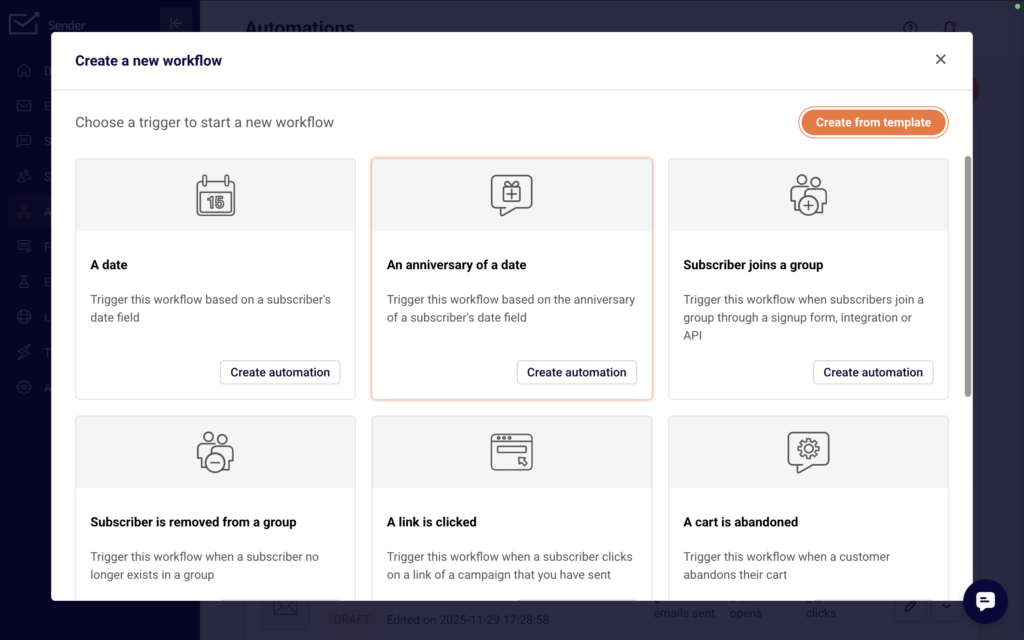
Automation: begin with a welcome series and a cart or checkout recovery journey. The workflow should have a documented trigger, delay, message purpose, exclusion rule and purchase exit. After the flows have had time to run, check the actual message path against your test records. The screenshot above shows the kind of automation canvas to inspect, but the live test is what verifies that Shopify events are arriving correctly.
Reporting: start with delivery rate, click rate, unsubscribe rate, orders and revenue trend. Avoid using open rate as the sole judgement because mailbox privacy features can distort it. The key question is whether an email or flow moved a useful commercial outcome without creating excess unsubscribes or support tickets.
Start by connecting Shopify, authenticating the sending domain, setting up a consent-first form and testing a welcome series plus cart recovery. Add new flows only after those two journeys have been checked with a real test order.
Sender pros and cons for Shopify
| Pros | Cons and checks |
|---|---|
| Generous free-plan capacity for a smaller store | Do not mistake a generous allowance for proof that every Shopify workflow meets your requirements |
| Campaigns, forms, landing pages and automation can live in one accessible account | Test the integration against product, customer, order, consent and purchase-exit scenarios |
| A sensible route for proving basic lifecycle marketing before committing to higher software costs | Review pricing beyond introductory offers as your list and send frequency grow |
| Can reduce early-stage operational complexity | Verify the reporting detail your team needs to connect email activity with Shopify revenue |
When Omnisend is the better fit for Shopify
Omnisend is a practical choice when you want an ecommerce-oriented platform and a more unified way to manage email, SMS and web push. It suits stores that want to move beyond occasional newsletters into a consistent programme of signup capture, campaigns, welcome journeys, cart recovery and post-purchase communication.

Choose Omnisend when: the store is ecommerce-first, the team is lean, and the goal is to run the core retention flows well without immediately needing the most complex possible segmentation or analytics setup.
The free plan currently has a 250-contact and 500-email monthly limit. That makes it useful for evaluating the workflow, but it is not a long-term cost model for a growing list. Before selecting a paid tier, estimate marketable contacts, campaign frequency, SMS use and the channels your team will genuinely maintain.
Omnisend pricing at a glance
Free: $0 for up to 250 contacts, 500 emails a month and 500 web-push messages. Paid: Omnisend’s pricing page showed Standard from $11.20 per month for the selected contact example at the time of review. Treat that as a directional entry point only. The billable total changes with the contacts who receive campaigns or automated messages, the billing cycle and optional channels such as SMS.
Omnisend needs a more careful budget model than a simple subscriber count. Export the last 90 days of engaged contacts, then separate campaign recipients from people who only receive automations. Price SMS independently by country and send volume. If a store will use email only, it should not pay for a multichannel story it has no plan to run.
How Omnisend works in a Shopify programme
Setup: connect the store, verify the sender domain, decide which existing signup forms and automations must be turned off, then run one test customer through the journey. The first audit should check subscriber source, product data, order data, discount behaviour and purchase exits. If cart recovery still runs inside Shopify while Omnisend sends another recovery series, customers can receive duplicate messages.
Automation: Omnisend’s visual editor is useful for a typical retail sequence because the team can place a delay, email, SMS, web push, split or A/B test on one canvas. The important operational question is not whether the canvas has many options. It is whether your team has written the rule for every branch. For example, a VIP branch needs a defined purchase threshold, a regular branch needs a different offer or message, and both need a purchase exit.
Reporting: review campaign and workflow performance against Shopify orders, but agree on an attribution window before comparing it with another platform. Otherwise two tools can claim different amounts of revenue from the same customer order. A good weekly review looks at delivered volume, clicks, unsubscribe rate, revenue trend and any flow that produces unexpected overlap.
Best first build: launch a signup form, a two- or three-message welcome series, cart or checkout recovery, and a post-purchase message. Do not begin with every template. Add browse recovery, win-back and SMS only after the first set works cleanly.
Omnisend is not a shortcut around lifecycle discipline. Test consent capture, product recommendations, purchase exits, frequency controls and mobile rendering. A customer should never receive an abandoned-cart message after buying, or an SMS that conflicts with the email they received ten minutes earlier.
Omnisend pros and cons for Shopify
| Pros | Cons and checks |
|---|---|
| Ecommerce-led workflow for campaigns, automation, SMS and web push | The free plan is a small test environment, not a long-term cost answer for a growing store |
| Good fit when a lean team wants common retention use cases in one platform | Map exactly which contacts become billable when they receive campaigns or automated messages |
| Prebuilt flow approach can help an inexperienced team start faster | Prebuilt flows still require offer logic, purchase exits, frequency rules and mobile QA |
| Multichannel messaging can reduce fragmented customer communication | Only add SMS or web push if consent, local rules and an ongoing content plan are in place |
When Kit is a better fit than a traditional Shopify email platform
Kit, formerly ConvertKit, deserves a place in this comparison because not every Shopify store is catalogue-led. Some brands are built around a founder, a newsletter, a community, a course, an education product or a content engine that happens to sell through Shopify. In that model, the relationship often begins with a form, landing page or creator email, not a product-page visit.

Choose Kit when: your business needs to grow and tag an audience around content and expertise, then connect that audience to Shopify. Its free plan currently supports up to 10,000 subscribers with unlimited landing pages, forms and broadcasts, which can be compelling for a creator-led brand at the audience-building stage.
Be careful if: your main need is sophisticated, product-heavy ecommerce automation. Review the Shopify integration and make sure the purchase, customer and abandoned-checkout behaviour you expect is available on the plan you are considering. Kit can be a strong communication platform without being the best replacement for every dedicated ecommerce lifecycle tool.
Kit pricing at a glance
Free: $0 for up to 10,000 subscribers, with unlimited landing pages, forms and broadcasts. Paid: Kit’s current Creator example shows $33 per month for 1,000 subscribers when billed annually. This is the important practical distinction: the free plan is extremely generous for audience capture and broadcasts, but the Visual Automations a brand may depend on are tied to paid Creator or Creator Pro plans.
For a creator-led Shopify store, the meaningful cost question is not merely, “How many subscribers do we have?” It is, “Do we need a simple newsletter and forms, or do we need paid automation, product launches, tagged journeys and an ecommerce workflow?” Make that decision before choosing a list-size tier.
A practical test is to ask where most revenue conversations start. If they start with content, education, lead magnets and a founder’s point of view, Kit may fit the business naturally. If they start with repeated browsing, product discovery, replenishment and complex merchandising, compare Omnisend and Klaviyo more closely.
How Kit works in a Shopify programme
Setup: begin with one source of truth for every form and a clear tag structure. A useful creator-led setup might tag people by lead magnet, topic, purchase intent and customer status. Bad tag naming turns a flexible audience tool into a confusing list of almost-identical segments, so document the tags before adding forms to a website or social campaign.
Automation: Kit’s Visual Automations are designed around entry points, actions and conditions. A subscriber can join via a form, a tag, a custom-field change or a purchase event, then enter an email sequence, wait, gain or lose a tag, update a field or take a different route based on a condition. That model is excellent for a guide-download welcome journey, course launch or creator offer. Confirm the plan requirements for the number and type of automations you intend to run.
Shopify fit: test a real purchase and confirm what changes on the subscriber record, what product information becomes usable, and whether your planned customer journeys can be expressed without manual workarounds. A content-led brand may need only purchase tagging and a post-purchase sequence. A large apparel catalogue may need more product-level merchandising than a creator-oriented setup is meant to provide.
Best first build: use one lead magnet form, an immediate delivery email, a short educational sequence, a link-click or purchase tag, then a product offer that matches the subscriber’s original interest. That is a much stronger starting point than importing every customer into one undifferentiated newsletter list.
Explore Kit for a Shopify brand
Kit pros and cons for Shopify
| Pros | Cons and checks |
|---|---|
| Strong audience-building position for newsletter, education and creator-led brands | It is not automatically the best first choice for a product catalogue requiring deep ecommerce orchestration |
| Free plan supports a large early audience with forms, landing pages and broadcasts | Confirm which Shopify events, purchase triggers and automation capabilities are available on your selected plan |
| Tagging and creator-style communication suit founder-led relationship building | Test product data, cart or checkout behaviour, and reporting before migrating a mature ecommerce list |
| A natural bridge from content capture to commerce | Paid automation and ecommerce requirements can change the true cost and operating fit |
When Klaviyo is worth the extra complexity
Klaviyo is usually worth considering when lifecycle marketing is already an operating discipline, not an occasional task. It can make sense when you have a meaningful customer database, enough repeat purchase behaviour to segment, and a marketer or agency who will use the additional flexibility to make better decisions.

Choose Klaviyo when: you plan to maintain advanced segments, use behavioural and custom data, test lifecycle messages, and reconcile platform reporting with Shopify rather than simply send more campaigns.
Klaviyo’s free plan currently allows 250 active profiles and 500 monthly emails. It is useful for testing, but a serious Shopify store should price the system using its likely active-profile count over the next 12 months. Clean up unengaged profiles, document suppression rules and agree on the campaign calendar before treating a headline plan price as your true cost.
Klaviyo pricing at a glance
Free: up to 250 active profiles and 500 emails a month. Paid: Klaviyo prices from its live calculator because the monthly total changes with active profiles, email, SMS, mobile and other selected products. That makes a generic “Klaviyo costs X” claim less useful than a real forecast. Start with cleaned, marketable profiles, select only the channels you will actively run, and model 12 months of growth.
The primary cost control is profile hygiene. Keep consent, suppression and engagement rules clean, then stop paying to repeatedly send to customers who no longer engage. The primary business check is ownership: a paid Klaviyo account is worthwhile only when a marketer or agency is using segmentation and testing to improve revenue quality, not merely sending the same campaign more often.
Do not choose Klaviyo because it is considered the default. If your account will contain one welcome flow, one cart flow and a monthly sale email, a simpler platform may create more value. Klaviyo becomes compelling when its deeper data and orchestration turn into specific improvements in relevance, retention and measurement.
How Klaviyo works in a Shopify programme
Setup: connect Shopify, authenticate the sending domain and establish profile hygiene before building a large flow library. Decide what counts as an active, unengaged, suppressed and VIP profile. That definition affects cost, deliverability and the quality of every future segment. A migration should preserve consent and suppression status rather than treating every historic customer as a new marketing contact.
Segmentation: Klaviyo earns its complexity when a store can act on more than basic groups. Examples include first-time customers versus repeat customers, high-value customers, buyers by collection, customers who have not purchased again within an expected product lifecycle, and subscribers engaged with a specific product category. Every segment should have a clear decision attached to it. If a segment will never receive a different message or offer, do not build it.
Flows and tests: build from a documented priority order: welcome, checkout or cart recovery, post-purchase, replenishment where the product genuinely has a repeat cycle, then win-back. Test one material variable at a time, such as a delay, subject line, offer or branch. Multiple simultaneous changes create a result nobody can interpret.
Reporting: make a shared definition for attributed revenue and compare it with Shopify’s actual order reporting. The platform can show strong workflow performance while the business is still over-sending or discounting too aggressively. Review customer experience signals alongside revenue, including unsubscribe rate, spam complaints, conversion and repeat-purchase quality.
Explore Klaviyo for Shopify Check Klaviyo pricing
Klaviyo pros and cons for Shopify
| Pros | Cons and checks |
|---|---|
| Deep segmentation and lifecycle flexibility for teams that work from customer behaviour | Extra depth becomes expensive shelfware if the account has no dedicated owner |
| Strong fit for systematic testing, reporting and multi-stage customer journeys | Keep active profiles clean and model the actual profile count, channels and growth rate before buying |
| Can support a more mature retention operation | Complexity increases the need for governance: naming, suppression, QA, ownership and reporting definitions |
| Useful when the business can turn data into a better offer or message | Do not migrate simply to copy a competitor’s flow library without an operating plan |
Shopify Messaging, formerly Shopify Email: when the native option is enough
Shopify Email has been renamed Shopify Messaging. The native product is a sensible starting point for a store that wants to create campaigns inside Shopify with minimal additional setup. It is especially useful when the team has not yet proven that it can maintain a bigger platform and simply needs to begin with consistent, relevant customer communication.

Shopify’s current pricing gives Basic, Grow, Advanced and Plus plans 10,000 free emails per calendar month. Extra emails are priced by volume, and abandoned-checkout automations are free and do not count toward the monthly email allowance. Check the live Shopify help page before budgeting because plan terms can change.
Shopify Messaging pricing at a glance
Included: 10,000 free emails per calendar month for Basic, Grow, Advanced and Plus stores. After that: Shopify currently charges $1 per additional 1,000 sends up to 300,000 emails, then applies lower rates at higher volume. Abandoned-checkout automations are free and do not count toward the email allowance.
This is the easiest price model to forecast. A 5,000-person recipient list receiving four campaigns creates about 20,000 campaign sends, so only 10,000 are above the included allowance before automation. That is roughly $10 at Shopify’s first overage tier, subject to current terms. Add a monthly spending alert inside Shopify, then make every broad send earn its place in the calendar.
Choose Shopify Messaging when: the store sends relatively few campaigns, needs a native workflow and is still learning the basics of email marketing. It is a good place to establish sound habits: permission-first forms, clear offers, mobile QA, sensible frequency and accurate brand communication.
Move beyond it when: the programme requires more sophisticated customer behaviour, deeper segmentation, complex testing, multi-channel orchestration or a more specialised lifecycle operating model. The right trigger for a move is a documented requirement, not the fear of using a simple tool.
How Shopify Messaging works in a Shopify programme
Setup: the app is available from Shopify admin. Confirm the sender email, make sure the store satisfies Shopify Messaging requirements, and set a monthly spending alert if volume could exceed the included allowance. The native setup removes integration work, but it does not remove the need to authenticate a sender, collect permission correctly and test every message on mobile.
Editor and campaigns: use a branded template, product or collection sections, clear buttons and a short message that matches the landing page. Shopify supports tailored sends to subscriber segments, and its templates can be adapted with sections such as products, images, text and buttons. Send a test to yourself before every campaign and confirm product availability, discount details and every destination link.
Automation: the native platform can support useful starting automations such as welcome, post-purchase and abandoned checkout. Begin with the one message that has a clear customer purpose. Abandoned checkout should help an interested buyer return to a basket, not become a blanket discount engine.
Cost control: calculate campaigns from sends, not list size. A 10,000-person recipient list receiving four campaigns produces roughly 40,000 campaign sends before any automation. Use Shopify’s monthly spending alert, check the current price tier, and avoid sending low-value broad messages simply because the editor makes them easy to create.
Explore Shopify Messaging Check Shopify Messaging pricing
Shopify Messaging pros and cons
| Pros | Cons and checks |
|---|---|
| Native Shopify workflow with very low implementation friction | Less suitable when sophisticated segmentation, orchestration or specialist reporting becomes an actual requirement |
| Included monthly email allowance helps a store begin without another software subscription | Budget carefully once campaign volume exceeds the included allowance |
| A clean place to establish consent, campaign and QA habits | Do not assume a native platform removes the need for deliverability, frequency and content discipline |
| Practical for occasional campaigns and simpler lifecycle needs | Document the exact missing capability before moving to a specialist tool |
Shopify email marketing pricing: free plans, billing models and what you will actually pay
Price should influence this decision, but a headline monthly rate is not a comparison. Each platform measures something different. Sender and Kit focus on subscribers. Omnisend counts the contacts receiving campaigns or automated messages. Klaviyo prices against active profiles and channel choices. Shopify Messaging charges mainly by email volume after its included allowance. The practical result is that two stores with the same number of customers can face very different bills.
Pricing snapshot checked 19 October 2026. Free-plan limits and promotions change regularly, so use the linked provider page to confirm the current offer before you subscribe.
Shopify email platform cost calculator
Enter the subscriber count you expect to market to. The estimates update instantly to the matching public email-plan tier.
Sender
Omnisend
Kit
Klaviyo
Shopify Messaging
Pricing bands checked 21 October 2026. These are base email-plan estimates in USD. Taxes, SMS, add-ons, promotions and billing country can change the final checkout total.
Enable JavaScript to calculate the relevant pricing tier.
Pricing comparison at a glance
| Platform | Free-plan or included allowance | Paid pricing reference checked | What actually drives the bill | Practical pricing advice |
|---|---|---|---|---|
| Sender | $0 for up to 2,500 subscribers and 15,000 emails a month | Standard was shown at $6.30 a month for 500 subscribers and 6,000 monthly emails on an introductory annual example | Subscriber tier, plan, send allowance, billing cycle and SMS use | Use the free tier to prove the programme, then compare the renewal price at your current list and two likely growth milestones. |
| Omnisend | $0 for up to 250 contacts, 500 emails a month and 500 web-push messages | Standard was shown from $11.20 a month for the selected contact example | Contacts receiving email or automation, billing cycle and optional channels such as SMS | The free plan is a test environment. Forecast the engaged contacts and automation recipients you expect, not only total Shopify customers. |
| Kit | $0 for up to 10,000 subscribers, with landing pages, forms and broadcasts | Creator was shown at $33 a month for 1,000 subscribers on annual billing | Subscriber tier and the plan level needed for automation and commerce workflows | Excellent for audience capture, but confirm whether the automation your Shopify programme needs is included on the plan you will buy. |
| Klaviyo | $0 for up to 250 active profiles and 500 emails a month | Use the live calculator, as paid pricing changes with active profiles and selected products | Active profiles, email volume, SMS and other products | Clean up suppressible profiles before pricing. The useful forecast is a 12-month model of active profiles and channels, not a headline entry rate. |
| Shopify Messaging | 10,000 free emails per calendar month on Basic, Grow, Advanced and Plus | $1 per additional 1,000 sends up to 300,000 emails, with lower rates at higher volume | Email sends beyond the included allowance | Multiply your marketable audience by your genuine campaign calendar, then add expected automation volume before assuming the included allowance is enough. |
How to read this table: Sender and Kit make list growth the main cost question. Omnisend's total depends on the contacts who receive campaigns or automated messages, and Klaviyo's depends on active profiles plus the products you select. Shopify Messaging is different because it is mainly a send-volume calculation after the monthly allowance. The listed paid figures are checked entry references, not universal prices. Promotions, currency, tax, billing cycle, list health and optional SMS can materially change the total, so model the same 12-month scenario in each provider's live calculator before committing.
A pricing example that prevents a bad decision
Imagine a 5,000-person marketable list. If you send four campaigns a month, campaign volume alone is about 20,000 sends before welcome, recovery, post-purchase or win-back messages are added. A tool billed by sends can behave very differently from one billed by active subscribers. Now imagine that only 2,500 of those contacts have engaged in the last 90 days. A platform whose price is tied to engaged or active contacts can produce a materially different forecast from one that counts the entire database.
Build a simple 12-month pricing sheet with five fields: marketable contacts, engaged contacts, campaigns per month, average automation sends per order or signup, and the countries where you will send SMS. Then compare the live calculators using the same assumptions. The winner is the platform that supports the programme you will actually run at a cost you can sustain, not the one with the smallest price printed on a comparison page.
Cost checklist before choosing a plan
| Cost input | Why it changes the answer | What to calculate |
|---|---|---|
| Marketable profiles or subscribers | Some platforms charge for contacts that are no longer engaged. | Remove duplicates and define a sensible suppression or sunset rule before comparing plans. |
| Monthly campaign volume | Send-based limits make a light and a heavy calendar very different. | Multiply your active list by the number of campaigns you will actually send. |
| Automation volume | Successful flows can generate more sends as order volume rises. | Forecast welcome, cart, post-purchase and replenishment sends separately. |
| SMS and web push | These can be valuable, but add consent, country and usage costs. | Model each channel only where it has a defined customer purpose. |
| Implementation and support | A cheap subscription can still require expensive agency or internal time. | Assign an owner for templates, flows, deliverability and troubleshooting. |
| Migration work | Consent records, forms, flows and reporting do not simply move themselves. | Estimate the one-off rebuild, QA and warm-up effort before you switch. |
The Shopify data and automation checks that matter more than feature lists
Whichever platform you choose, begin with the customer journeys that have a clear purpose. The goal is not to build every available automation. It is to build a small set of journeys that use trustworthy Shopify data and stop at the correct time.
| Flow | Commercial job | Non-negotiable checks |
|---|---|---|
| Welcome series | Turn a new subscriber into an informed first customer. | Consent source, incentive delivery, timing, preference capture and purchase exit. |
| Browse abandonment | Help a genuinely interested customer continue product discovery. | Viewed-product data, sensible delay, relevance window and frequency cap. |
| Cart or checkout recovery | Recover high purchase intent without creating pressure or conflicts. | Cart contents, inventory, discount logic, checkout rule and immediate purchase exit. |
| Post-purchase | Reduce buyer anxiety and prepare the next useful interaction. | Order details, delivery expectations, support route and appropriate cross-sell logic. |
| Replenishment or repeat purchase | Prompt a return only when the product's real lifecycle supports it. | Product eligibility, expected usage period, stock status and exclusion rules. |
| Win-back or sunset | Re-engage selectively or protect sender reputation by suppressing inactivity. | Engagement definition, offer logic, consent and the rule after no response. |
Build a controlled test record for each flow. Subscribe, browse, add to cart, start checkout and place an order. Save the message timings and screenshots. This catches duplicate sends, bad product data and missing purchase exits before customers see them.
Do the deliverability work at the beginning, not when revenue has already fallen. Authenticate the sending domain, use permission-based lists, avoid purchased contacts, respect unsubscribes and send carefully to your most engaged audience during any platform or domain transition. If Klaviyo messages are already going to spam, start with this deliverability diagnostic before blaming the platform.
When should a Shopify store switch email marketing platforms?
Switch when you can name a real business requirement that the current platform cannot support. Do not switch because a competitor's comparison says another tool has more features. More features are useful only when they change a decision or improve a customer journey your team will own.
| A migration may be justified when | Do not migrate just because |
|---|---|
| You cannot run a documented flow, data integration or reporting requirement in the current tool. | A sales page makes a capability sound interesting. |
| The team repeatedly loses time to operational friction in essential work. | You have not audited the current account's configuration or old automations. |
| Consent, profile fields, suppressions and preference data can be mapped and tested. | You want to move a large quantity of unengaged or uncertain contacts into a new account. |
| A named person can rebuild flows, validate data and monitor deliverability. | No one has time to own testing, warm-up or the new programme after launch. |
| The 12-month cost is clear and the programme has a justified growth path. | The entry plan looks cheaper this month. |
Keep the previous platform available in read-only form until you have validated data mapping, forms, unsubscribe handling, core flows and revenue reporting. Export consent records, suppression lists, engaged segments, templates, assets, flow logic and reporting definitions before any account is closed. A safe migration is a controlled operational project, not a bulk contact import.
The final verdict: which Shopify email app should you choose?
Choose Omnisend if you are a typical product-led Shopify store that wants the best overall ecommerce operating fit. It is the strongest all-round starting recommendation here because email, SMS, web push and common ecommerce journeys sit in the same customer-retention workflow. It is not automatically the least expensive platform, so price it against your actual contact base and channels before committing.
Choose Sender if cost and a capable free start matter most. Its free allowance gives a smaller store room to put forms, campaigns, a welcome flow and a recovery flow in place. The deciding test is whether its Shopify integration and reporting cover the exact programme you need, not whether the free plan is large.
Choose Kit if the audience is the product engine. A founder-led newsletter, course, membership, digital product or education-led brand can get more value from Kit's audience-building strengths than from a traditional catalogue-first platform. Test the ecommerce behaviour before assuming it replaces a dedicated lifecycle system.
Choose Klaviyo if you have a real lifecycle operation. It is worth the investment when profile data, segmentation, experimentation and reporting translate into work your team will carry out every week. If nobody will own that work, its capabilities will not create a return merely by existing.
Choose Shopify Messaging if you need a clean native start today. It is not a consolation prize. It is the sensible answer for a store that needs a permission-first email programme before it needs a bigger stack. Move only when there is a written requirement it cannot meet.
About this guide and its author
This guide was written by Gurbaj Singh, an ecommerce SEO and Klaviyo consultant. The recommendations are based on operating fit, documented capabilities and the decision criteria explained above. They are not a substitute for your own data, deliverability history, consent model or implementation test.
Update policy: pricing, feature limits and product terminology can change without notice. The facts in this article were checked in October 2026 against the official resources listed below. The guide should be reviewed when a provider materially changes its Shopify integration, pricing model, product limits or messaging channels.
Frequently asked questions
What is the best email marketing app for Shopify?
The best app depends on the store. Sender is a strong budget-led starting point, Omnisend suits ecommerce teams wanting email, SMS and web push, Kit fits creator-led brands, Klaviyo suits mature lifecycle operations, and Shopify Messaging is useful for a native low-complexity start.
Does Shopify have email marketing built in?
Yes. Shopify Email has been renamed Shopify Messaging. It lets eligible Shopify merchants create and send marketing email from within Shopify. It is a practical native starting point, especially for modest campaign volume and simpler needs.
What is the best free email marketing app for Shopify?
There is no universal winner. Sender's current free plan supports up to 2,500 subscribers and 15,000 monthly emails, which makes it attractive for many early-stage stores. Kit's free plan supports up to 10,000 subscribers for a creator-led audience, while Omnisend, Klaviyo and Shopify Messaging have different free allowances and use cases. Test the workflow, not only the headline limit.
Is Sender good for Shopify?
Sender can be a good fit for a budget-conscious Shopify store that needs campaigns, forms and basic automation. Test the Shopify data sync, product content, segments, cart or purchase events and reporting before making it your long-term platform.
Is Omnisend better than Klaviyo for Shopify?
Neither is better for every store. Omnisend can suit a lean ecommerce team that wants a practical multichannel programme. Klaviyo can be stronger when advanced behavioural data, segmentation, testing and reporting will be actively maintained by a capable operator.
Is Klaviyo worth it for a small Shopify store?
It can be, but only if the store will use its extra depth. If your immediate plan is a welcome flow, a cart flow and occasional campaigns, a simpler tool may create more value. Klaviyo becomes easier to justify when segmentation, lifecycle testing and customer data influence real marketing decisions.
Can I use Kit with Shopify?
Yes, Kit connects with Shopify. It can be particularly useful when a founder, newsletter, course, digital product or education-led audience is central to the brand. Catalogue-heavy stores should still test the ecommerce workflow they need, including purchase and abandoned-checkout behaviour, before choosing it.
Shopify Messaging vs Klaviyo: which should I use?
Use Shopify Messaging when you need the simplest native way to start sending and your programme is still straightforward. Consider Klaviyo when you have a defined need for deeper customer segmentation, advanced lifecycle operations, testing or reporting, and someone who will use that capability consistently.
How much does Shopify email marketing cost?
The answer depends on the provider's billing model, your active contacts, campaign volume, automation sends, SMS use and growth. Shopify Messaging currently includes 10,000 free emails per calendar month for Basic, Grow, Advanced and Plus plans, with additional volume billed separately. Always use live pricing pages for a current forecast.
Can I migrate my Shopify email list without losing subscribers?
You can normally migrate legitimate subscribers, but a safe move requires more than exporting email addresses. Preserve consent evidence, unsubscribe and suppression status, key profile fields, engaged segments and preferences. Rebuild and test forms and flows, then keep the former tool available until unsubscribe handling and reporting are validated.
Need help choosing a Shopify email platform?
Bring your current list size, expected send volume, three essential flows and the person who will run them. The decision becomes clearer when it is based on the programme you can realistically operate.